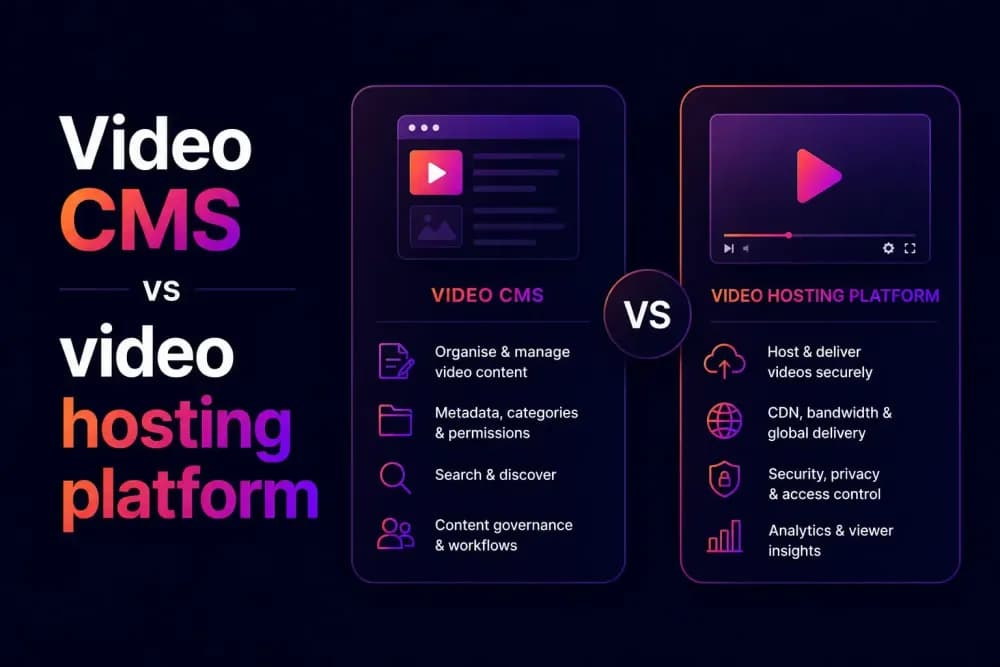
A video CMS that runs into slow playback, weak analytics, or limited access control is usually missing the hosting infrastructure underneath it. Organisation tools alone don't deliver video, secure it, or measure how viewers engage with it. This guide compares a standalone video CMS against a full video hosting platform, and shows what changes once real hosting infrastructure is added.
What's the difference between a video CMS and a video hosting platform?
A video CMS is the layer that organises video, folders, metadata, tagging, and publishing controls. A video hosting platform is the infrastructure underneath it, storage, delivery, security, and analytics, that determines how well those organised videos play, load, and perform for viewers. Cinema8's video hosting platform includes CMS functionality as one part of a larger system, instead of treating organisation and delivery as separate purchases.
The distinction is important because a video CMS can look complete in a demo, folders, playlists, a clean upload interface, without ever being tested against real playback conditions. A team can organise a video library beautifully and still have videos that buffer, security that doesn't hold up, or no way to see whether anyone watched to the end.
This confusion is common because both categories use overlapping language. A vendor selling a narrow video CMS will still describe it as "hosting" your videos, since technically it does store them somewhere. An effective test is whether that storage comes with scalable delivery infrastructure, security controls, and analytics attached, or whether those are separate problems a team has to solve elsewhere.
Video CMS vs video hosting platform: a side-by-side comparison
The table below compares what's typically included in a standalone video CMS against a feature-rich video hosting platform, using Cinema8 as the reference point for what a comprehensive hosting platform can deliver.
| Capability | Standalone video CMS | Video hosting platform (Cinema8) |
|---|---|---|
| Video storage, folders, and metadata organisation | ✔ | ✔ |
| Global CDN and adaptive delivery | Varies by vendor, often requires separate integration | ✔ |
| Password protection, domain restrictions, tokenised access | Varies, often basic or unavailable | ✔ |
| Viewer-level analytics (engagement, drop-off, device data) | Typically limited to view counts | ✔ |
| Monetisation (advertising, subscriptions, pay-per-view, shoppable video) | Rarely included | ✔ |
| In-video interactivity (forms, CTAs, quizzes) | Not typically supported | ✔ |
| CRM, LMS, and ecommerce integrations | Varies, often limited to basic embedding | ✔ |
| ISO 27001-certified infrastructure | Varies by vendor | ✔ |
| Scales from free plan to enterprise (SSO, unlimited seats) | Varies by vendor | ✔ |
*Standalone video CMS capabilities vary significantly by vendor. This reflects what's typically included in a narrow, publishing-focused video CMS versus a video hosting platform with CMS functionality built in.
Organisation is the one row where a standalone CMS holds its own, that's what it's built for. Everything below it is where the gap between the two categories shows up.
How does a video hosting platform do more than a video CMS?
A video CMS organises video. A video hosting platform runs it: delivering playback, controlling access, measuring what viewers do, and passing that data to other systems. These are separate layers, and not every product covers both. Cinema8 includes the organisation layer and the infrastructure it runs on.
Delivery and security
A video CMS can store and label a video correctly while still delivering it poorly, since playback speed depends on the infrastructure underneath the CMS layer. A team using a narrow CMS often discovers this only once videos are live, when playback stutters under real traffic or on certain networks, since the CMS was never tested against delivery conditions at scale.
Cinema8's built-in video CDN handles delivery directly, so playback performance isn't dependent on a separate service being connected correctly. Access control follows the same pattern: Cinema8 protects video through password protection, domain restrictions, and tokenised access, backed by ISO 27001-certified infrastructure. A standalone CMS often stops at a basic "shareable link" setting, with no way to restrict access by domain, expire a link automatically, or verify a viewer's identity before playback starts.
Analytics and monetisation
Video performance sits in four measures: completion rate, drop-off point, replayed segments, and interaction clicks. A file list carries one number, the view count, logged the moment playback starts. Everything a team would act on happens after that moment.
Cinema8's analytics dashboard tracks engagement at viewer level, with heatmaps and funnel analysis. Viewer level means the data attaches to a contact record. Through the HubSpot and GA4 integrations, a named viewer's watch behaviour lands against their record rather than in a monthly total.
Monetisation runs on the same clock. A VAST ad call fires at a timestamp. Pay-per-view checks entitlement before the first frame renders. Checkout opens while the viewer is still watching. Not every hosting platform builds these in. Cinema8 supports VAST/VPAID advertising, subscriptions, pay-per-view, and shoppable video with in-player checkout. Each of these needs a live session to fire against.
Integrations and workflow
A video CMS that exists in isolation creates a second problem: video performance data has nowhere to go. A lead captured through an in-video form is only useful if it reaches a CRM automatically, and a training video's completion data is only useful if it reaches a learning management system.
Cinema8 connects this layer directly, integrating with CRM platforms such as HubSpot and Salesforce, supporting SCORM export for learning management systems, and embedding into general content management systems like WordPress. A standalone video CMS can usually be embedded somewhere too, but without the CRM and LMS connections behind it, that embed is often just a player with no data flowing anywhere useful.
Organisation and scale
This is where a video CMS still earns its place, and Cinema8 includes this layer too. Cinema8's CMS layer organises video through folders, playlists, and channels, with CRM-integrated lead forms and branded player customisation built into the same dashboard. The difference is that this organisation layer sits on hosting infrastructure, scaling from a free plan through to enterprise deployments with SSO and unlimited seats.
What are the pros and cons of a standalone video CMS vs a video hosting platform?
A standalone video CMS and a video hosting platform each have strengths and limits. The strengths cluster around cost and simplicity on one side, and capability at scale on the other.
Standalone video CMS, pros:
- Lower cost for small video libraries with simple organisation needs
- Fast to set up when the only requirement is uploading and labelling video
- Works well as a lightweight layer on top of an existing general CMS like WordPress
Standalone video CMS, cons:
- Delivery performance depends on whatever infrastructure sits underneath it, which can be inconsistent
- Access control is often limited to basic sharing settings, not domain restriction or tokenised access
- Analytics rarely extend past view counts, with no engagement, drop-off, or funnel data
- Monetisation and in-video interactivity are typically unsupported
- Scaling to a larger library or team often means outgrowing the tool entirely
Video hosting platform, pros:
- Delivery, security, analytics, and CMS tools all managed from one place
- Access control built for real business use: password protection, domain restrictions, tokenised access
- Scales from a free plan to enterprise deployments without switching tools
Video hosting platform, cons:
- More capability than a very small library may need, so the cost may not be justified for a handful of simple, low-stakes videos
- Some advanced configurations, particularly enterprise-level integrations, may require setup time a basic CMS wouldn't need
Why does Cinema8 combine hosting and CMS tools in one platform?
Cinema8 is a secure video hosting platform that includes CMS functionality, folders, playlists, channels, and branded player controls, built directly into the same dashboard as its hosting, delivery, and security infrastructure. That means delivery, security, and analytics are already accounted for by the time a video is ready to publish.
Cinema8 also connects that CMS layer to CRM platforms like HubSpot and Salesforce, supports SCORM export for learning management systems, and embeds into general content management systems like WordPress, so video organisation isn't isolated from the rest of a team's existing systems. This is the difference a side-by-side comparison table can't fully capture: managing one platform instead of keeping two systems in sync.
What should you do once your video CMS has outgrown its limits?
Once a video CMS has outgrown its limits, the fix is moving to a platform that includes hosting infrastructure and CMS tools together, rather than bolting delivery, security, or analytics onto the existing CMS as separate add-ons. Adding services one at a time tends to recreate the same gaps this article has covered, slow delivery, weak access control, thin analytics, just spread across more vendors instead of being solved.
Cinema8's video hosting platform includes the CMS functionality a team needs, folders, channels, branded players, alongside the delivery, security, and analytics infrastructure a standalone CMS typically lacks. Explore Cinema8's plans to see how hosting and content management work together in one platform.