
Video analytics for employee training
Cinema8’s video analytics help L&D teams understand how employees engage with internal training content. Heatmaps show where viewers rewind or lose focus, while completion data highlights which modules are working well and which need refinement. These insights help teams strengthen skills training, improve content clarity and build learning programmes that support long-term employee development across the organisation.
Trusted by leading brands around the world


















Cinema8’s video analytics tools give training teams clear insight into how employees interact with each video module. You can see which sections learners replay, skip or drop off, helping you refine explanations and improve training flow. Completion data highlights whether employees finish required lessons, while engagement patterns reveal which topics capture interest. These insights help HR and L&D teams strengthen skills development programmes, improve content structure and build training libraries that support ongoing employee growth.
How to analyse employee training videos with Cinema8
Use Cinema8’s analytics to evaluate engagement and refine employee training modules with clear behavioural insights.
Upload your training videos to Cinema8 or open existing modules, then access the analytics dashboard to view heatmaps and core engagement metrics.
Review drop-off points, repeated rewinds and skipped sections to identify unclear explanations, pacing issues or topics that need stronger visual support.
Update your training videos or supporting materials based on these insights, and use our A/B testing to measure the impact of your improvements.
Why use Cinema8’s video analytics for employee training?
Cinema8 gives L&D teams detailed insight into how employees interact with training content, making it easier to refine lessons and reinforce key skills. Heatmaps and completion metrics highlight where learners struggle or lose focus, while engagement trends show which topics resonate most. These insights help teams strengthen training materials, support clearer explanations and create learning programmes that evolve with employee needs.
How Cinema8 supports employee training through analytics

Spot unclear topics through replay behaviour
Improve training flow with clearer structure
See which skills need additional learning support
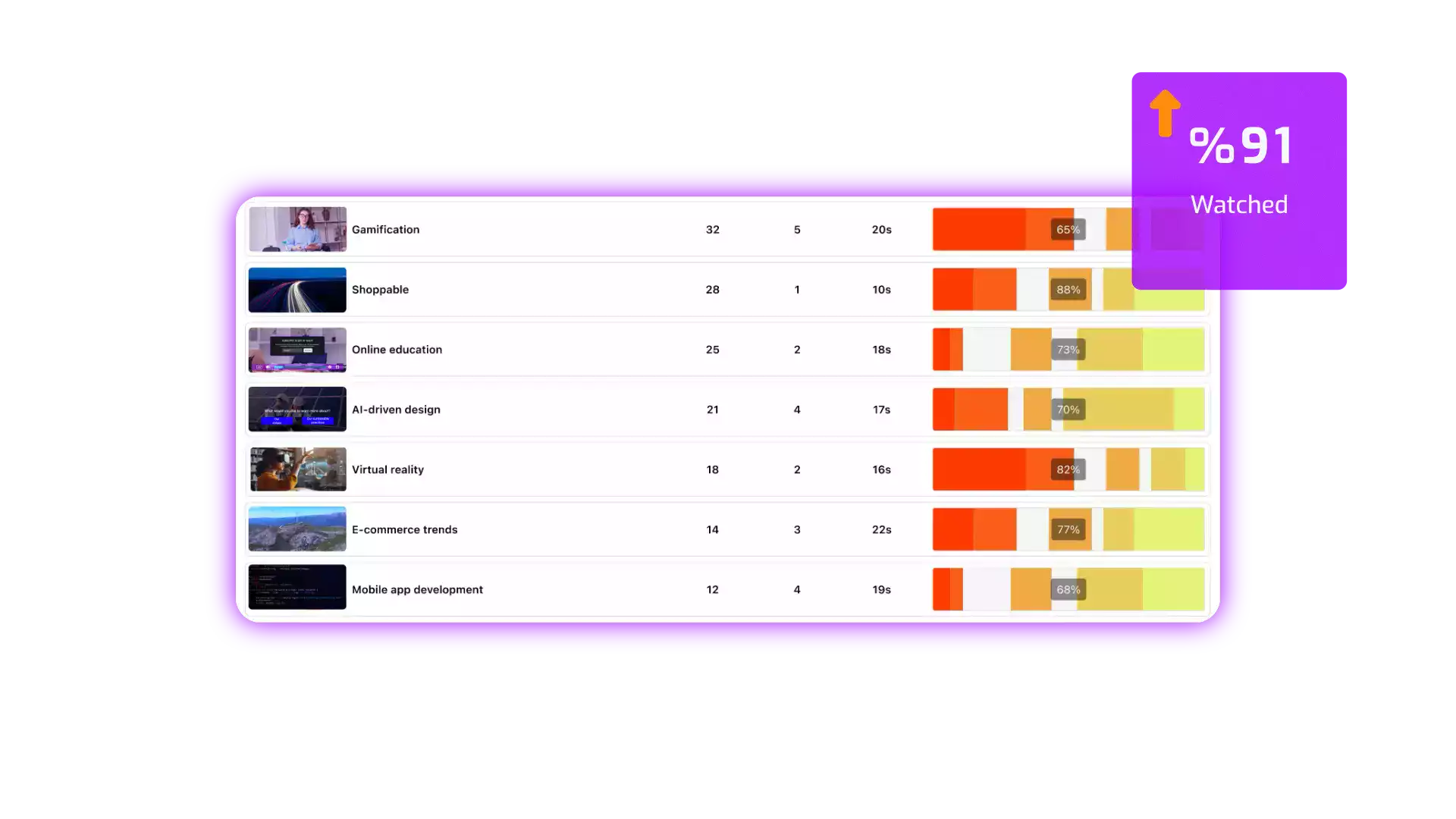
Cinema8’s heatmaps show which sections employees replay or skip during training and assessment videos. L&D teams can use these patterns to pinpoint unclear explanations, adjust pacing or revise examples, ensuring each module supports stronger understanding of essential skills and processes.
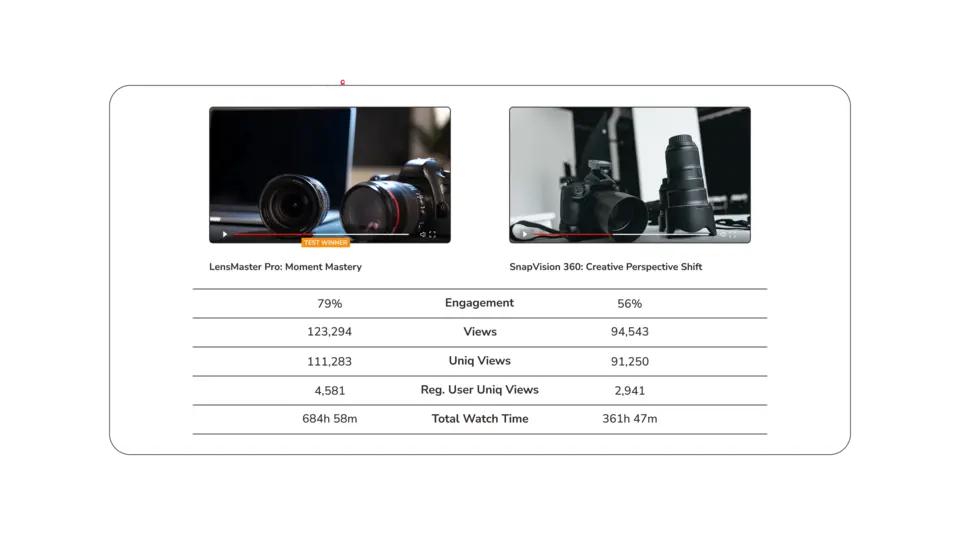
Training teams can compare engagement levels across different videos to see which topics resonate most with employees through Cinema8's A/B testing tools. High drop-off rates or low completion scores help identify content that needs strengthening, while strong patterns highlight topics employees find valuable.
Cinema8's interactive video analytics reveal how different departments interact with training videos, showing which groups complete modules fully and which may require additional support. These insights help teams tailor follow-up learning, refreshers or workshops based on real behavioural data.
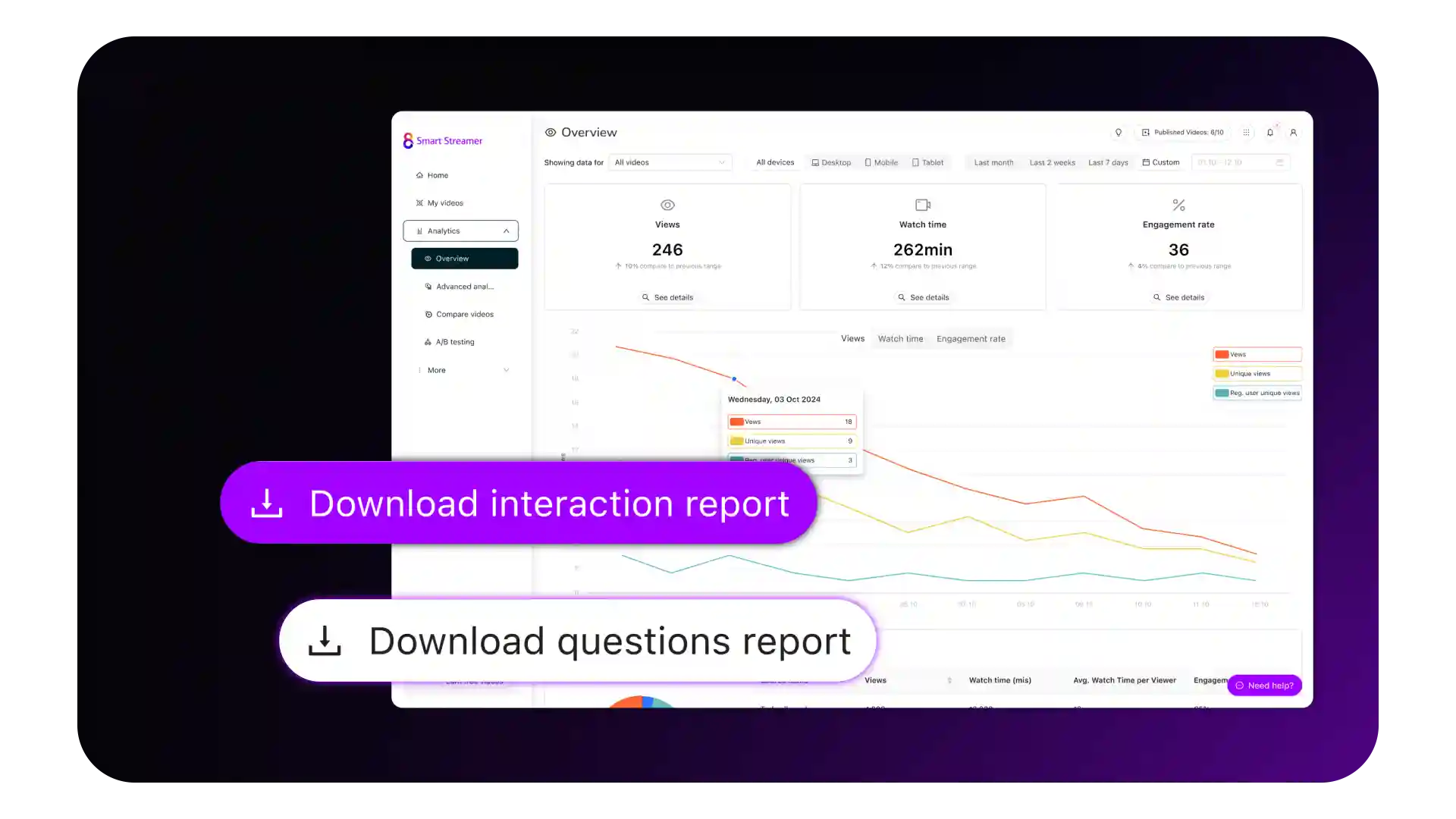
See how teams use Cinema8 to strengthen their video performance with clear engagement insights.
During travel restrictions, Cinema8 proved valuable as a tool. Its platform offered straightforward yet complete tools, allowing us to give virtual demonstrations of our solutions in a secure and efficient way.
Jay Yalung
Art Director, Marketing and E-Commerce / Leica Geosystems
Cinema8 software engaged and motivated students with 360-degree videos at the Tate Gallery, featuring past student projects. Staff support was responsive and helpful with training. A valuable tool for educational institutions.
Chi-Ming Tan
Unit Lead Lecturer LCCA / London College of Contemporary Arts
Cinema8 has been instrumental in compiling all of the videos for a research project on employment for the blind or visually impaired, by offering an easy-to-use web-based platform for building Interactive Videos.
Sarah Moody
Communications Coordinator / Mississippi State University
Cinema8 was chosen for its ease of use and ability to create interactive videos through an intuitive interface. The team received great support and reasonable pricing. leading to a renewal of their partnership. Cinema8's support helped them meet project deadlines.
Michel Sohel
Media Consultant / Eastern Michigan University
Starter
$12
per month billed annually
Everything in Free, plus:
- Lead gen forms with CRM/email integration
- 360 degree interactive video support
- Unlimited screen recording
- Customisable video player
- 1TB bandwidth
Recommended
Pro
$24
per month billed annually
Everything in Starter, plus:
- Sticky hotspots for moving objects
- AI chaptering + SEO metadata
- AI-powered speech search
- Video heatmaps + advanced reports
- 2TB bandwidth
Pro Plus
$84
per month billed annually
Everything in Pro, plus:
- FTP upload for video libraries
- Webhook-based event notifications
- Domain restriction
- Priority + dedicated support
- Unlimited seats