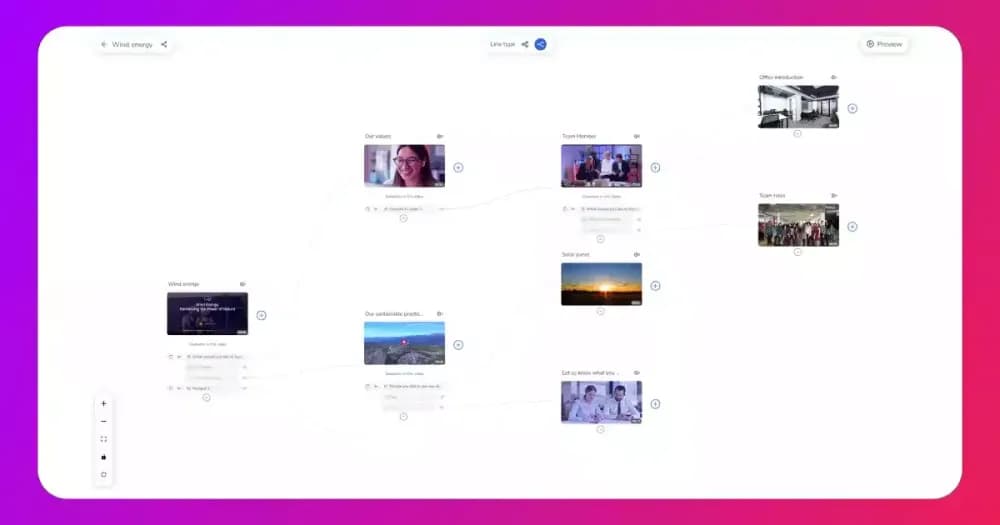
Video branching and quizzes give L&D teams a practical way to personalise corporate training paths. Each employee is routed through content that reflects their role and existing knowledge. Rather than a fixed module for every learner, the path adapts based on quiz responses and role attributes. This article covers how both tools work together in a corporate training programme.
What does it mean to personalise corporate training paths?
Personalised corporate training paths deliver different content sequences to different employees based on role, knowledge level, or pre-assessment performance. A generic training module is built for the average learner, and it tends to miss those with more experience and those who need more support. Cinema8's interactive video tools, let training teams embed branching logic and in-video quizzes inside the video player, without developer input.
A sales hire completing onboarding has different knowledge gaps to a senior engineer on the same programme. Serving both the same content wastes time for each. In a mixed-experience team, a single module moves too slowly for experienced staff and too quickly for those who are new. Using video branching and quizzes, L&D teams can build role-specific differentiation directly into the video, so each learner sees content matched to their actual starting point.
How does video branching work in employee training?
Video branching routes a learner to different content sections based on a condition set inside the video. That condition can be a quiz answer, a button selection inside the player, or a role attribute assigned at enrolment. Branching allows content to adapt based on what the learner knows or which role they hold. Attention can drop when training content is not matched to the learner's level, which is why using interactive video to improve training retention starts with getting the routing logic right.
Three training categories produce the clearest benefit from video branching, and each does so for a different reason.
- Onboarding: New hire content needs vary significantly by department, seniority, and prior experience. A branching onboarding video can route a first-time manager through people leadership content. A returning contractor can bypass sections covered in a previous engagement. Each learner receives a focused experience without the L&D team maintaining separate onboarding modules for every variation.
- Compliance training: Regulatory requirements differ by region, job function, and risk level. A compliance video with branching can serve jurisdiction-specific content to employees in different countries. High-risk roles can be routed through more detailed procedures without lengthening the module for lower-risk staff.
- Skills development: Experienced employees should not sit through foundational content they have already demonstrated competency in. A skills path built with branching can use a pre-assessment to move capable learners directly to advanced material. Learners who need foundational grounding are routed there first before the path advances.
The mechanism behind all three is conditional logic embedded at specific points in the video timeline. When a learner reaches a branch point, the player evaluates the condition and routes accordingly. Platforms that support SCORM and xAPI can pass this data back to the LMS, making branching paths trackable alongside other training records. This is highly valuable for regulated industries that need completion evidence at the individual level.
How do in-video quizzes improve personalised corporate training paths?
In-video quizzes test knowledge immediately after a concept is introduced, while it is still in the learner's working memory. Learners tested on a concept within seconds of encountering it retain more than those tested after a long, uninterrupted sequence. Researchers Henry Roediger and Mark McDaniel, whose work underpins the book "Make It Stick", identify this as the testing effect, and it applies to workplace training contexts as reliably as it does to academic ones.
In-video quizzes in corporate training serve two distinct functions. The first is knowledge verification: the learner must show understanding before the video advances. This prevents employees from completing required training without engaging with the content. The second function is path selection, where the quiz answer determines which content section the learner enters next.
Using video branching and quizzes together, L&D teams can personalise corporate training paths by placing a pre-assessment at the start of a training video. Employees who score above a set threshold are routed past foundational material to advanced content. Employees below the threshold receive the foundational sections before progressing. Skilled employees get a faster, more focused session, while under-prepared employees get the support they need before advancing.
What steps are needed to build a personalised training path with video?
Building a personalised video training path requires four planning decisions before any video goes into production. Getting these right before the build starts prevents rework later and ensures the branching logic reflects genuine learner needs.
- Define the learner groups: A personalised corporate training path is built around variables that genuinely change what an employee needs to learn. Role, knowledge level, region, and prior training history are the most common variables. Identifying which apply to your programme determines how many branches you need and how different the content for each branch should be.
- Map the branch points: Decide where the video should fork and what condition triggers each fork. A quiz answer is the most common trigger, but a learner attribute passed from the LMS can also drive routing. Each branch point should produce a genuinely different content experience. Video branching that leads to the same material in a different order adds complexity without much benefit.
- Write the quiz questions for branching: Personalised questions that drive routing decisions must test the knowledge that determines which path is appropriate. Questions that most learners will answer correctly regardless of experience make the branching logic redundant. The questions should reflect real knowledge gaps unique to each situation or role.
- Confirm the tracking requirements: Decide which completion events need to be recorded in the LMS before building the video branching experience. Clarify what data needs to flow back for compliance reporting or management dashboards. SCORM and xAPI both support this, but configuration differs between platforms and LMS providers. Confirming requirements with your LMS administrator before production starts saves significant time later.
How does Cinema8 enable video branching for training?
Cinema8 is a secure video hosting platform with built-in interactive video tools, viewer-level analytics, and LMS integration support. Training teams can drag and drop quiz widgets onto the video timeline using the platform's editor and can build branching conditions that personalise corporate training experiences. No coding is needed to configure branch points, define routing logic, or set quiz thresholds.
Cinema8's video hosting platform sits alongside your LMS while SCORM export and xAPI while connects the two without any additional development. This means L&D managers can see where individual learners dropped off and which branches they took. Quiz performance data for each learner is available inside Cinema8's analytics dashboard. This gives training teams specific evidence about where a module is working and where it is not.
Where should L&D teams start with branching video training?
The most important step before building a branching video training programme is mapping knowledge gaps by role. Personalisation without an accurate learner model produces branches that feel arbitrary. Learners notice quickly when routing does not reflect their actual situation. Before any video goes into production, the L&D team should know which employee groups need different content and why.
Branch conditions should be built around genuine knowledge gaps identified in that mapping. A job title is not a reliable proxy for knowledge level. A quiz-based pre-assessment at the start of the video gives the routing logic something concrete to work from. It also gives the L&D team a baseline to measure against once the programme is live.
A mandatory compliance update or a specific onboarding section makes a practical first branching project. Both have defined learner groups, clear knowledge requirements, and existing content that can be restructured into branches without building from scratch.
How video branching and quizzes make corporate training paths worth personalising
Video branching and quizzes are useful tools to personalise corporate training, but their value depends entirely on the decisions made before the video is built. Quiz questions need to surface real knowledge variance and branch conditions need to reflect what different learner groups actually need to cover. Without that groundwork, the routing logic has no conditional decisions to act on.
The programmes that improve over time are built by L&D teams who revisit their quiz design and branch conditions after the first cohort completes them. When learners consistently drop off at the same point or score poorly on the same question, the L&D team has something specific to act on. Branch selections and quiz scores tracked at the individual level make that visible.
Cinema8's video branching tools and viewer-level analytics work together inside a single video hosting platform, so that data is available from the first module a team publishes. Book a demo to see how Cinema8 handles branching and quiz-based training.