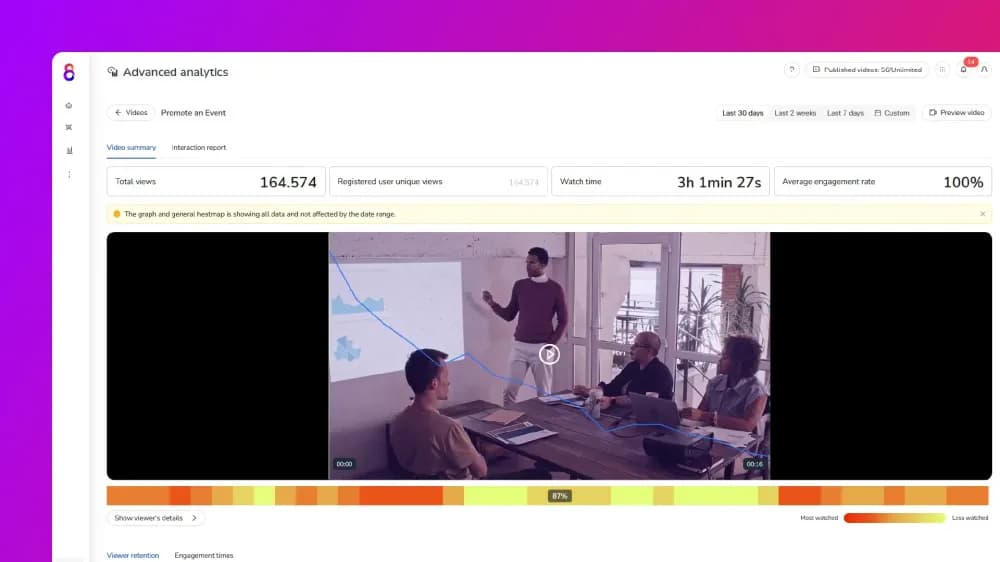
Using video analytics for customer health scores works by connecting post-sale viewing behaviour to individual contact records in your CRM platform. Onboarding video completion rates, feature adoption engagement, and replay behaviour give customer success teams early signals on adoption and churn risk. This guide covers which video metrics to track, how to weight them, and how Cinema8 surfaces that data at contact level.
What is a customer health score?
A customer health score is a composite metric that customer success teams use to predict renewal, expansion, or churn risk. It combines product usage data, support ticket volume, login frequency, and NPS responses into a single score that flags accounts needing attention. Most CS teams calculate health scores inside platforms such as HubSpot or Salesforce, and Cinema8's video analytics dashboard connects directly to these tools to add viewer-level video engagement as a scored input alongside existing product usage and support signals.
Video engagement is a dimension most health scoring models are missing entirely. A customer who completes your interactive product onboarding video and replays a feature tutorial in their first 30 days is building product knowledge at a pace that login frequency alone cannot show. A customer who has not opened any product video in 45 days is showing a specific kind of disengagement: they have stopped learning the product. That distinction matters because customers who stop engaging with your product education content often stop engaging with the product itself shortly after.
The operational gap is that video engagement data sits inside a hosting platform, separate from the CRM where health scores are calculated. For most customer success teams, that means a meaningful behavioural signal never reaches the scoring model at all. Closing that gap requires a video platform that records viewing behaviour at the contact level and passes it to the CRM in real time, so health scores reflect how customers are engaging with your product content.
Which video metrics feed into a customer health score?
The video metrics that carry signals for customer health scoring are viewer-level, tied to individual named contacts in your CRM. A contact with 14 views across your self-service support video library could be working through advanced tutorials or stuck on the same troubleshooting clip. The view count alone does not tell you which. The following post-sale metrics each reveal a different dimension of engagement: depth of viewing, repetition, recency, and inactivity.
- Onboarding video completion rate: As one of the most direct early signals for new accounts, completion rate measures how far a specific contact progresses through your setup walkthrough. A customer who watches 90% or more of a video is on a different adoption track from one who exits at 25%. Where drop-off happens consistently at the same timestamp across multiple new customers, it identifies exactly where onboarding content is failing to resolve a step.
- Feature adoption video engagement: Feature-specific tutorials show whether customers are building product knowledge that surpasses basic usage. A contact who watches your "advanced reporting" tutorial through to completion is signalling intent to use that feature. A contact who has not opened feature-specific video content in 60 days is likely using only a fraction of what they pay for. The video data surfaces these insights before a support ticket or NPS response does.
- Product update watch rate: Regular viewers of your monthly "what's new" video releases are tracking where your product is going and investing in the relationship. Customers who consistently skip those updates may be disengaging before that registers in login data or satisfaction scores. This metric is particularly useful for accounts approaching renewal, where recent update engagement signals interest.
- Replay behaviour on troubleshooting content: A single replay on a how-to video suggests a customer is working carefully through a setup step. Repeated replays of the same troubleshooting section, particularly when followed by a support ticket, identify a customer pain point and a gap the video is not closing. Tracking which sections get replayed most frequently also tells your content team exactly where product education needs to improve.
- Watch inactivity: A contact who has not opened any product video in 30 or more days is showing disengagement. That signal often appears in video data before it shows up in login frequency or NPS results. Setting an automated alert for contacts crossing a 30 or 45-day inactivity threshold gives customer success teams a consistent trigger for proactive outreach.
- Expansion content engagement: A customer who watches your pricing overview or an advanced use case walkthrough is displaying upgrade intent before raising it in a conversation. That signal belongs in the expansion pipeline. When this behaviour appears alongside high onboarding completion and regular feature video engagement, it is a strong indicator that an expansion conversation will land.
How to add video analytics to a health scoring model
A customer logging in every day has demonstrated nothing about whether they know how to use the feature they are paying for. Onboarding video completion data fills that specific gap. It shows where understanding breaks down, which engagement is genuine, and which accounts are quietly drifting before a renewal conversation appears on the calendar.
Adding video analytics to a customer health scoring model requires three things to be in place.
- Identify viewers at the contact level: Anonymous session data cannot contribute to contact-level health scoring. Your video platform needs to associate each play with a known CRM contact. That works via SSO, a logged-in user token, or a CRM integration that maps video sessions to named records in HubSpot or Salesforce. Without this, video engagement data stays aggregate and cannot influence individual account scores.
- Define which behaviours raise or lower the score: Assign a numerical weight to each viewing behaviour that reflects its significance in your retention model. A practical starting framework for SaaS teams looks like this:
- High onboarding completion (80% or more): +20 points
- Feature adoption video engagement within 60 days: +15 points
- Product update video watched within 7 days of release: +10 points
- Engagement with pricing or advanced use case content: +25 points
- Early exit from onboarding video (below 30%): -15 points
- No video watch activity in 45 or more days: -20 points
- Repeated replays of the same troubleshooting section: -10 points
- These weights are a starting point. Review them against actual renewal and churn outcomes every quarter and adjust where a behaviour no longer predicts what you need it to predict.
- Connect video data to your CRM in real time: Video engagement data has to flow into the system where health scores are calculated to have any operational effect. For many teams, that includes HubSpot or Salesforce. The connection works via webhook events, REST API calls, or native integrations built into the video hosting platform. Updates need to reach the CRM in real time so customer success teams can act while a signal is current.
Cinema8's video hosting platform includes integrations that pass viewer-level video engagement data directly to contact records in real time. Teams building health scores inside HubSpot can incorporate Cinema8 watch data alongside email engagement and product usage signals. That includes onboarding completion rates, replay events, and inactivity periods, all without manual exports or additional data engineering. Cinema8 scales from free-plan individuals to enterprise teams with SSO, domain restrictions, and unlimited seats. The same viewer-level tracking applies whether a team manages 20 customer accounts or 2,000. For video engagement applied at the pre-sale stage to qualify prospects, Cinema8's video analytics can be used for lead scoring too.
What video health data looks like in practice
Consider a SaaS customer success team hosting four customer video assets: a day-one onboarding walkthrough, an advanced features tutorial, a monthly product update, and a troubleshooting library covering the five most common support queries. Each video is embedded inside a customer portal with viewer tracking active and contact-level data flowing into HubSpot.
A contact who completed 88% of the onboarding walkthrough in week one is showing strong early adoption behaviour. That same contact opened two feature tutorials in their first 30 days and watched the last two product updates. The appropriate next action is an expansion conversation.
A contact who exited the onboarding walkthrough at minute three and has not returned to any video in the library for 45 days is showing early disengagement. Two support tickets filed in that same period add further context. The video data reveals what the tickets alone cannot: this customer never completed onboarding, which explains the recurring issues. A structured re-onboarding outreach before the renewal date is the right response.
A contact who has completed standard onboarding and watched your pricing overview alongside an advanced use case video in the same week is showing upgrade signals. That contact should trigger a CSM notification.
In each case, the signal was already visible in the video data before it appeared anywhere else in the health model. Without viewer-level tracking connected to a scoring model, those distinctions were invisible.
Why video engagement data makes health scores more accurate
Customer success teams working from login data alone can only see when a customer is present. Video completion data shows whether that customer is building the knowledge that makes them stay. Those two dimensions do not always point in the same direction, and the gap between them is often where customer churn begins.
The teams that get the most from video analytics for customer health scores treat every customer-facing video as a tracked asset from the first upload. Cinema8's viewer-level analytics generate onboarding completion rates, replay events, expansion content signals, and inactivity flags from the first play. That data flows into HubSpot contact records automatically via Cinema8's native integration, giving customer success teams a richer picture of account health from the moment a customer starts watching. Accounts that look stable on login data alone sometimes show early warning signs in their video behaviour weeks before a renewal conversation. That window is where customer success teams can act.
Explore Cinema8's plans and start your 14-day free trial for advanced analytics that help you score customer health.